How the AI assistant works
Guru is VedicTime's AI Jyotish assistant. Ask a question in ordinary language, explore a chart, and follow up on the answer. Guru combines the context selected for your dialogue with VedicTime's calculation tools when additional information is needed.
This section covers best practices and credits, packages, and subscriptions, as well as the controls you use to start a conversation.
Start a dialogue
Sign in to your personal account. You can ask from the assistant workspace or open Ask Guru from the astrology workspace. Open threads opens your conversations; choose New dialogue to start with a new subject. On a phone, open the dialogue sidebar with the menu button first.
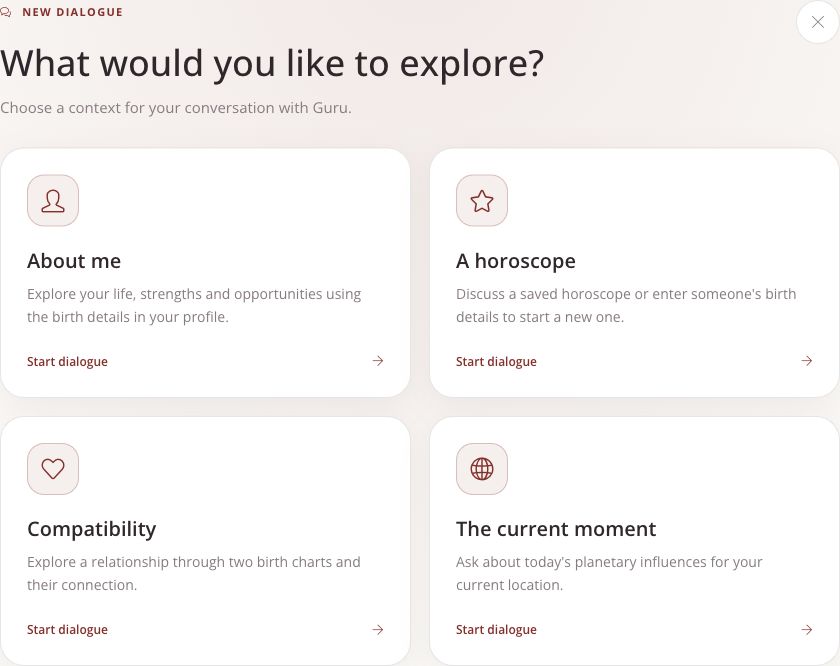
Choose the subject of your dialogue before asking a question.
| Context | When to use it |
|---|---|
| About me | Questions about your own chart, using the birth details saved in your profile. |
| A horoscope | A specific saved horoscope, or a new chart entered through the birth-details form. |
| Compatibility | Questions about the relationship between two selected birth charts. |
| The current moment | Today's planetary influences for the current location shown in the app. |
Check the selected person, birth details, or location before sending. If the app asks for missing birth details, complete the form first. For help choosing a birthplace and entering local birth time, see Calculate a birth chart.
Check what Guru sees
The Guru sees row beside the input shows the dialogue's subject and the additional context selected for the next question:
- Saved chart attaches another horoscope. Remove its tag when it is no longer relevant.
- Memory includes or excludes saved personal context for the next question.
- Transits, where available, attaches current planetary positions and today's transits.
These choices matter: a question such as “What does this mean for me?” is clearer when the intended chart is selected. On mobile, tap the input to expand it and reveal the context row. An empty input collapses again when you leave the composer.
Ask, read, and follow up
- Ask one clear question about the selected subject.
- While Guru works, the status may describe an activity such as looking into the horoscope or checking transits. The answer can appear gradually.
- Read the answer, then ask a related follow-up in the same dialogue. Suggested questions are another way to continue; selecting one sends a new question and uses credits under the usual rules.
- Check Credits used beneath the completed answer. Its final cost may appear shortly after the text finishes. The remaining-credit badge updates when the cost is received.
Guru can request additional calculations such as planetary positions, planetary strengths, Panchang, Sade Sati, or compatibility. The calculations needed depend on the question; not every answer uses every tool.
Personal memory across dialogues
Memory stores personal context separately from an individual conversation. Open it from the assistant's dialogue sidebar to review About me, saved facts, and facts awaiting approval.
Choose how new facts are handled:
| Setting | Effect |
|---|---|
| Save automatically | New facts can be saved and used in future answers. |
| Ask me first | Suggested facts wait for your approval in Memory before they are used. |
| Off | Guru neither saves nor uses personal memory. Existing entries remain available for you to manage. |
Automatic collection works in general and personal dialogues with Memory enabled. It pauses when extra charts are attached and does not run in horoscope or compatibility dialogues. The Memory tag controls whether saved personal context is included in your next question.
Starting a new dialogue does not clear account memory. Edit or remove outdated facts in Memory; changes affect future questions, while previous messages stay in their dialogues.
Read answers critically
Guru generates interpretations and can make mistakes. If an answer seems to describe the wrong person or period, check the selected context first. Ask which chart factors support the interpretation, and compare them with the chart or calculation report. If your birth time is approximate, say so rather than treating time-sensitive conclusions as exact.