
Read and search transits
A birth chart refers to the birth moment. A transit describes a changing condition over a later or earlier interval. Always check which time and location the page is using before comparing its results with a natal chart.
Start from a birth-chart report
Open Transits in the public birth-chart report. This section is headed Transits at birth time: it lists intervals containing the birth moment, not today's sky. Read each item together with its start and end date and time.
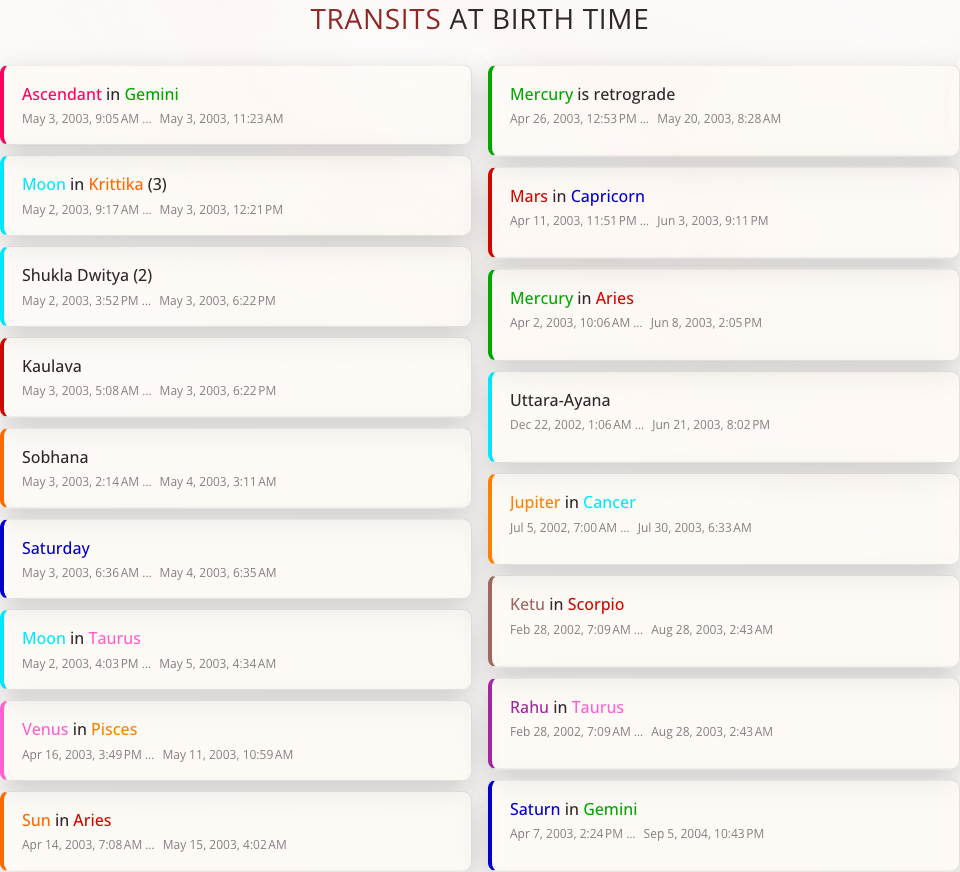
In a saved horoscope, the Planets section has a Transits area with Cards and, where available, Timeline views. Its cards also use the horoscope's birth moment. Use the card labels to identify the condition being shown before comparing its interval with a planetary period.
Explore the transit module
Sign in and open Transits from the main menu. The module has Timeline, List, and Search views.
- Check the selected moment and the application's current location. This is the location used for exploring the sky, which may differ from a saved birthplace.
- Choose Timeline for an overview of intervals. Change Scale to inspect a shorter or longer span.
- Use List to read individual conditions and their time boundaries.
- Use Search when you need an interval satisfying specific conditions rather than a general overview.
Find matching intervals
In Search, start with one rule:
- Set From date and Through date, or select a quick period and its direction.
- Choose a Transit type, then the planet, condition, and value required by that type. For example, choose Zodiac sign, Moon, Is, and a sign you want to investigate.
- Choose Search and read the matching intervals.
- Add another rule only when the first result is clear. Match ALL rules (AND) means every condition must hold at the same time; it does not return separate results for each rule.
- Use Show 10 more periods if more matches are available. Where offered, a result action opens the corresponding moment in Muhurta.
Available transit types, date windows, and number of conditions depend on the account's access. Use the options offered by the form and read the explanation on locked controls.
Understand empty results and boundaries
Search works with stored transit intervals. Missing coverage or intervals without a known end can be excluded, so an empty result does not prove that a condition can never occur. Try fewer rules or another date range. For a timeout, shorten the range or simplify the query.
When using Stored longitude, the value describes the interval between recorded crossings, not a continuous position calculation. Read the form's hint before comparing it with an exact chart longitude.
Use Limit result dates to the selected period when you want the returned intervals clipped to your requested range. Keep that choice consistent when comparing searches.