Explore the chart report
After calculating a birth chart, read the report in stages. First check the birth details, then the chart and planet table, and only then move to strength indicators and time-based analysis.
Start with D1 and D9
The public calculator shows D1 Rasi and D9 Navamsha. D1 is the starting chart; D9 is a divisional chart. Check the chart title before comparing placements: the two diagrams represent different calculations, so their signs and houses need not match.
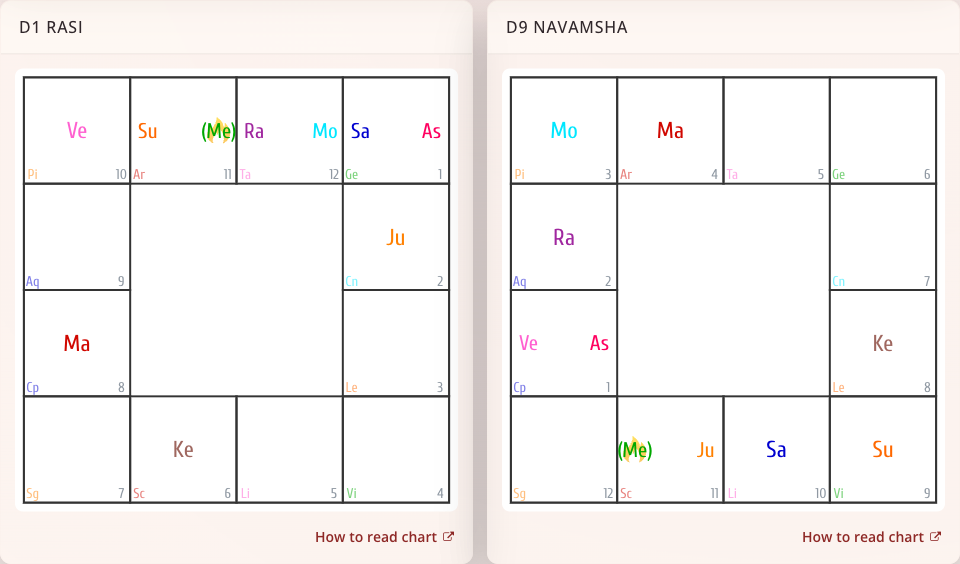
Use the chart-reading guide for symbols, house numbers, selections, and aspect layers.
Compare the chart with planet information
Open Planet information in the public report navigation. In a saved horoscope, the corresponding table is under Planets → General information.
Read one planet at a time. Compare its sign and position with the diagram, then look at its constellation and other listed properties. A sign, a house, and a constellation are different coordinates or classifications; do not substitute one for another.
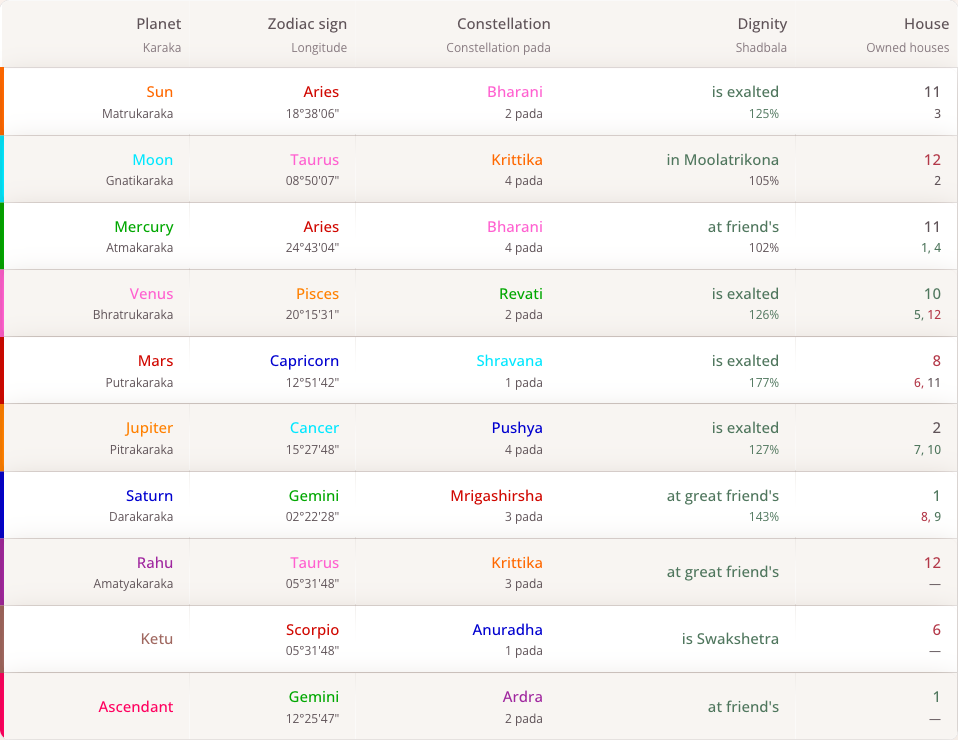
In this example, the Sun row shows Aries, Bharani, and house 11. These describe the same placement in different ways. Owned houses identifies the houses ruled by the planet; it is not another list of the houses it occupies.
If a placement seems inconsistent, first check that you are comparing the same chart type and birth details. For different results between services, also compare the calculation settings rather than changing the birth time to force a match.
Read strength indicators
The Planet strength section of the public report includes Ashtakavarga diagrams. Read the heading of each diagram: an individual planet's points and the combined total are different measures.
In a saved horoscope, Planetary strength offers Shadbala and Ashtakavarga views. Shadbala shows planetary strength; Ashtakavarga shows a distribution of points across signs. Use the chart's labels and details when comparing values. These scores are not interchangeable, and a higher number alone is not a complete interpretation of a planet or house.
Continue in a saved horoscope
In the personal account, open a horoscope from My Horoscopes. Its sections also include Time, Descriptions, and Yogas. Descriptions explain placements; Yogas lists chart combinations. Read the displayed conditions alongside the chart instead of drawing a conclusion from a combination's name alone.
The public calculator and the personal account have different controls. A feature shown in an account guide may require signing in or access under your current plan; follow any lock or restriction message displayed by the application.
Next steps
- Explore planetary periods for a selected date.
- Read and search transits for changes over time.
- Save and share a horoscope to return to it later.