
Planetary periods
Periods, or dashas, organize a horoscope's time sequence. Start with the broad period and then inspect its subperiods. Keep the birth details fixed while changing the date you want to examine.
Find periods in the public report
- Calculate a birth chart. For practice, use 3 May 2003, 10:00 AM, Lisbon, Portugal.
- Open Periods in the report navigation.
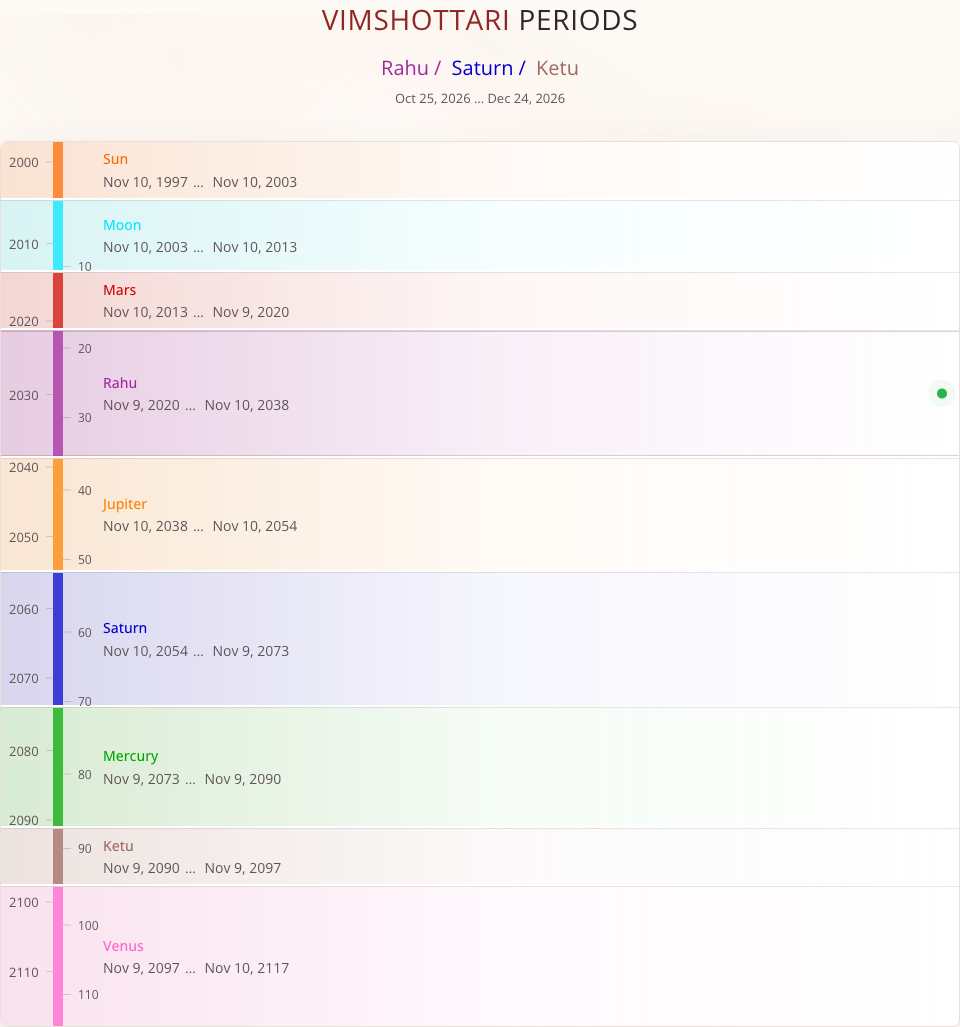
- Read the current Vimshottari sequence and its date range above the list.
- Compare it with the main periods below. Each row identifies its planet and start and end dates; the vertical layout also shows the progression through years.
The current sequence depends on when you open the report. It is not a permanent property of the example screenshot or birth date. The public list is an overview; use a saved horoscope for interactive exploration of dates and nested periods.
Choose a date in a saved horoscope
In the personal account, open a saved horoscope and select Time.
- Check the selected date and time above the timeline. Select either to change it.
- Move to Periods and select Vimshottari Dasha.
- Click a period row to explore its nested periods. Read the full sequence and date range, not only the last planet's name.
- Compare the period information with the selected moment above the timeline. Selecting a period can also move the date being explored.
The selected moment is the date of analysis. It does not edit the saved birth time. To correct the original birth details, use the horoscope editing controls.
Compare period systems
| System | What to follow in the interface |
|---|---|
| Vimshottari Dasha | The sequence of planets and the bounds of each nested period |
| Chara Dasha | The sequence of zodiac signs and its own date ranges |
| Yogini Dasha | The Yogini sequence and its own date ranges |
Chara and Yogini, and the extended annual-chart controls, require a paid subscription for personal charts. Celebrity charts have extended timeline access. A locked control explains the applicable restriction.
Do not treat rows from different systems as equivalent just because their dates overlap. Record the system, complete sequence, and selected date when comparing results or asking the AI assistant about them.
Annual chart
Where available, use Varshaphal → Select age in the Time section. Choosing an age moves the analysis to the calculated annual-chart moment. Read the displayed time; do not assume that it is identical to the original birthday's clock time.
If the result seems unexpected
Check the selected date, period system, and birth details before comparing results. A nested row describes a smaller interval within its parent. If a section is locked, changing dates will not unlock it; check the access message.