Read a birth chart
This guide explains how to read the chart interface in VedicTime: identify planets, distinguish signs from houses, and follow the connections shown by the aspect layers. Start with the placements, then explore one kind of connection at a time.
Need a chart first? Follow the birth chart calculation walkthrough. For your first reading, open D1 Rasi, the main birth chart. Other divisional charts describe different parts of the astrological analysis; check the chart title before comparing placements.
All worked examples use 3 May 2003, 10:00 AM, Lisbon, Portugal. Enter the local time; VedicTime applies the historical time zone for Lisbon. Use the same details to reproduce the illustrations.
Find your starting point
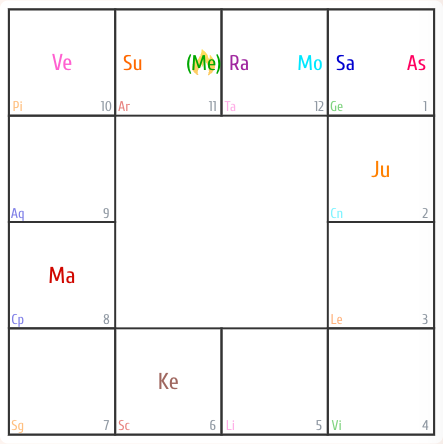
The illustrations below use the South Indian layout. Its twelve outer cells represent zodiac signs, whose positions stay fixed. Aries is the second cell from the left along the top edge; the signs continue clockwise through Taurus, Gemini, Cancer, Leo, Virgo, Libra, Scorpio, Sagittarius, Capricorn, Aquarius, and Pisces. Pisces occupies the top-left corner.
The ascendant, also called Lagna, determines where the first house starts. Find its label — As, Asc, or Ac, depending on the display. It is a reference point, not another planet.
In this sign-based layout, count houses clockwise from the ascendant's sign: that cell is house 1, the next sign is house 2, and so on through house 12. The small house numbers help you check your count. Do not confuse a house number with the number or abbreviation of a zodiac sign.
Read the example step by step:
- As is in Gemini (Ge), so Gemini is house 1. Saturn (Sa) occupies the same cell.
- The next cell clockwise is Cancer (Cn), house 2, containing Jupiter (Ju).
- Leo (Le) follows as house 3; Virgo (Vi) is house 4.
- Mars (Ma) is in Capricorn (Cp), house 8. Venus (Ve) is in Pisces (Pi), house 10.
An empty cell still represents a sign and a house. It does not mean that the corresponding area of life is absent.
If your chart looks different
The North Indian layout keeps the houses fixed and places signs within them. Do not use the South Indian cell positions to read it. Choose the South Indian format in chart settings to follow these examples.
Identify planets and symbols
The legend pairs names with the usual non-Sanskrit abbreviations. Planet identifiers, aspect lines, and highlights use the application's planet colors. Shades can differ between light and dark themes and the illustrations, so use the labels as well as color.
| Object | Chart label |
|---|---|
| Sun | Su |
| Moon | Mo |
| Mercury | Me |
| Venus | Ve |
| Mars | Ma |
| Jupiter | Ju |
| Saturn | Sa |
| Rahu | Ra |
| Ketu | Ke |
| Ascendant | As / Asc / Ac |
Rahu and Ketu are the lunar nodes; the interface groups them with the planets. If Sanskrit names are enabled, the abbreviations change.
Two additional markings appear in the example:
- Parentheses, such as (Me), indicate retrograde motion.
- A flame behind a planet marks combustion. In the example, Mercury has both markings. These are planet states, not aspect indicators.
For astrological interpretation, keep three questions separate: the planet describes the function being considered, the sign describes its manner of expression, and the house identifies the area of life. A color or a single line does not by itself establish a favourable or unfavourable result.
Select a planet or sign
In an interactive chart:
- On a computer, move the pointer over a planet or sign to preview its connections. Click to keep that selection active; click the selected object again to release it.
- On a phone or tablet, tap the object to select it, then tap it again to release it.
- With a keyboard, use Tab to reach a planet or sign, Enter or Space to toggle selection, and Escape on the selected object to release it.
Selection highlights the object you are inspecting. The aspect layers determine which additional outlines and lines appear. The images in this guide are static examples: open the calculated chart to try the controls.
Outgoing aspects
Select a planet and look for outlines or rings around other planet labels. They identify the recipients of that planet's aspects. The outline takes the color of the source, rather than the recipient.
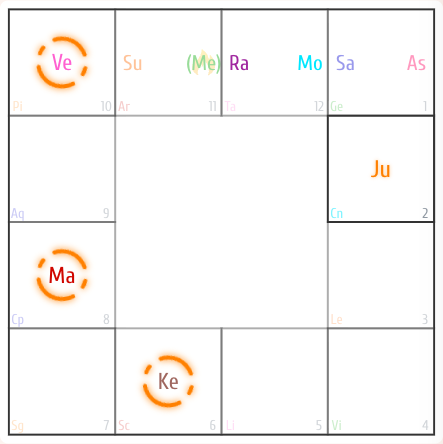
- Read the selected planet's label to establish the source.
- Find the outlined planet labels and identify each recipient.
- Read each recipient's sign and house to place the connection in context.
Several outlined planets mean several recipients. In traditional interpretation, Jupiter's connections are often considered in relation to growth and guidance, and Mars's in relation to action and tension. Their meaning still depends on the rest of the chart; the display itself shows the connection, not a verdict.
Incoming aspects
Keep a planet selected and follow the dashed lines leading to it. Each starts at a planet giving an aspect. Its color identifies that source planet, so incoming lines can have different colors.
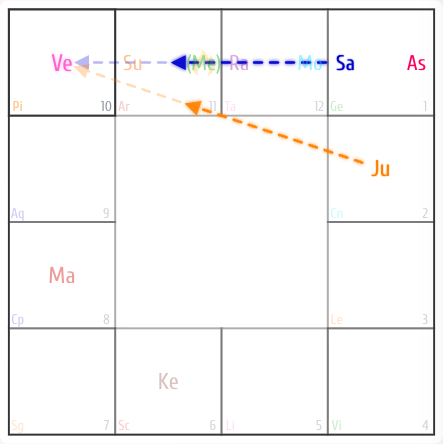
This view helps you inspect the selected planet as a recipient. Compare the sources and their placements before combining them in an interpretation. Here, Venus receives aspects from Jupiter and Saturn. Read each source separately: Jupiter is in Cancer, house 2; Saturn is in Gemini, house 1; Venus is in Pisces, house 10.
Outgoing and incoming aspects answer different questions. An aspect from one planet to another does not automatically mean that the second planet aspects the first in return.
Aspected signs
Select a planet and look for a thick outline around an entire sign cell. These are signs receiving its aspects. As with outgoing planetary aspects, the outline uses the source planet's color.
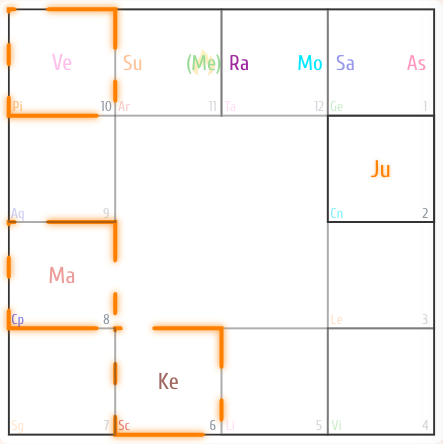
Read the highlighted sign and its house number. This view reveals connections to areas of the chart even when a highlighted cell contains no planets. Keep that separate from the question of which individual planet receives an aspect.
Sign-to-sign aspects
Select a sign cell, rather than a planet. This layer shows relationships between signs themselves.
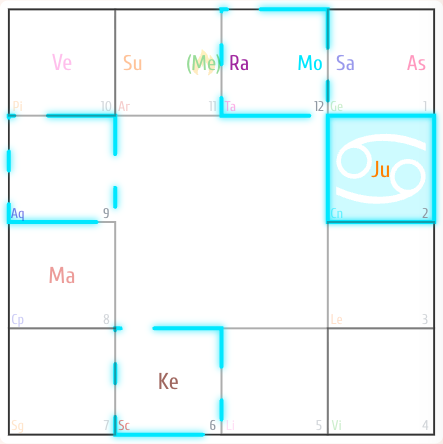
Read the visual cues together:
| Cue | Meaning |
|---|---|
| Colored background and sign symbol | The sign currently selected; its background color comes from its ruler. |
| Outline around another sign | A sign connected by a sign aspect; the outline uses the selected sign’s ruler color. |
In this example Cancer (house 2) connects with Taurus (house 12), Scorpio (house 6), and Aquarius (house 9). The relationship is reciprocal. The highlights use the Moon’s color because the Moon rules the selected sign, Cancer. The current South Indian chart shows these connections as cell outlines.
Use this layer to examine the pattern of connections between signs and their houses. It is a different layer from planetary aspects; do not treat a line between signs as an additional aspect from every planet inside them.
Adjust the display
Open application settings, signing in if requested, and find the chart settings. You can change the chart format, Sanskrit names, sign labels, house numbers, and individual aspect layers. These options change the presentation, not the birth details used for the calculation.
The aspect controls correspond to the views above:
| Settings group and option | What it displays |
|---|---|
| Planet Aspects → Planet Conjunction | Planets in the same sign as the selected planet. |
| Planet Aspects → Projected to Planet | Recipients of the selected planet's outgoing aspects. |
| Planet Aspects → Receivable From Planet | Incoming lines from planets aspecting the selected one. |
| Planet Aspects → Projected To Sign | Signs aspected by the selected planet. |
| Sign Aspects → Receivable from Sign | Outlines of the signs connected to the selected sign in the South Indian chart. |
To learn the interface, enable one layer at a time. For a less crowded chart, turn off the layers you are not currently reading. A hidden line is not evidence that an aspect is absent: check the active selection and display settings first.
A complete reading sequence
- Check the birth details and the chart title; begin with D1 Rasi.
- Find the ascendant and establish house 1.
- Identify the planets and their signs.
- Read their house numbers and any state markings.
- Select one planet and inspect its outgoing aspects.
- Compare the incoming aspects to that planet.
- Look at the signs it aspects, including empty cells.
- Select a sign and examine the sign-to-sign connections and their rulers.
- Combine the placements and connections in an interpretation, rather than judging a planet from one highlight.
If the diagram becomes difficult to follow, release the selection and start again with fewer layers. If symbols are too small, open an illustration at full size or zoom in with your browser. For other interface questions, see Questions and support.